

You MUST register and activate your AllGo Mastercard Gift Card before you can use it.
How To Activate your AllGo Physical Gift Card
Go to allgo.getmybalance.com and click ‘Create Account‘ (or login if you already have an account and skip to Step 4 below).


If you are creating an allgo.getmybalance account for the first time:
MFA secures your account by adding your Mobile Number and a Secure Login PIN to the login process.

MFA is now set-up, and the next time you log in from a new device, you can choose whether to send a login code by email or SMS. Click here to watch video on Setting Up MFA on your Cardholder login
Log into your allgo.getmybalance account, navigate to My Cards, and click Activate Card. Enter the 2 activation fields-

1. Your Last Name exactly as it appears on the card carrier (it’s case sensitive).
2. The Activation Code given to you by the company or employer who gave you the card.

Before you email us, post your question into our AI Search Bar below for an immediate response!

+353 1 253 0040
We close at 3pm on Fridays from May to August.
Enable your AllGo Mastercard Gift Card for 3D Secure to securely spend online. You must Register & Activate your card in your allgo.getmybalance.com account before you can enable it for 3D Secure.

In your allgo.getmybalance.com account, navigate to My Cards. Beside your card, click ‘Action’ and then ‘View’.

Click 3DS Enrollment on the left hand side menu.

Enter in your mobile number in the format 0861234567 with the correct country code flag (default is Ireland) and your surname.

3D Secure is now enabled on your card. When you make a purchase online, you may be sent an SMS Code to your mobile to verify your purchase.

Multiple Cards: If you have multiple cards registered in your account, you need to enable 3D secure for each card individually.
Updating your mobile number: Repeat the process above!
Once you have activated your card in your allgo.getmybalance.com account, you can use it in any of the 100 million retail outlets worldwide that accept Mastercard*.
To spend, make sure you have sufficient funds to cover your entire purchase, swipe your card along the payment terminal card reader and sign for your purchase. No PIN required.
*There a few spending exceptions and restriction – please see the FAQ section for full details.
To use your card online, you first need to register your card for 3D Secure. To do that, please follow the instructions in the 3D Secure section above.
Then, you can use the details printed on your card as a Debit/Credit Card payment method at an online checkout.

Once you have activated your card in your allgo.getmybalance.com account, you can log in to see your balance and full card transaction history.
If your AllGo Mastercard Gift Card is lost or stolen, you may lose the funds on your card. You should immediately suspend your card in your Cardholder Account or by calling the Lost & Stolen Helpline during business hours on +353 1 513 3656.
To order a Replacement Card, please click below
Yes, ALL Physical Mastercard Gift Cards must be activated and registered online by the card recipient.
Please note, for regulatory and security reasons, AllGo Mastercards can only be activated within the European Union (EU) or the United Kingdom (UK) by cardholders over 18 years of age.
For step-by-step instructions on how to activate your card, please see the detailed guide here.
Don’t forget to register your card for 3D Secure if you want to spend it online.
For security purposes, the purchaser of your card has been sent an Activation Code which is requested in the ‘code’ field for your AllGo Mastercard, for them to pass on to all recipients. Please contact the purchaser of your card to confirm the activation code.
(Please note, if you used an order portal to order your card, your Activation Code will be your 5-digit order portal pin)
Please see Step 3 of our Activation Guide here for further information.
You must enable your AllGo Mastercard Gift Card for 3D Secure to securely spend online. You must Register & Activate your card in your allgo.getmybalance.com account before you can enable it for 3D Secure.
For step-by-step instructions on how to register your card for 3D Secure, please see the detailed guide here.
Once 3D Secure is set up, you can use your card details to shop online!
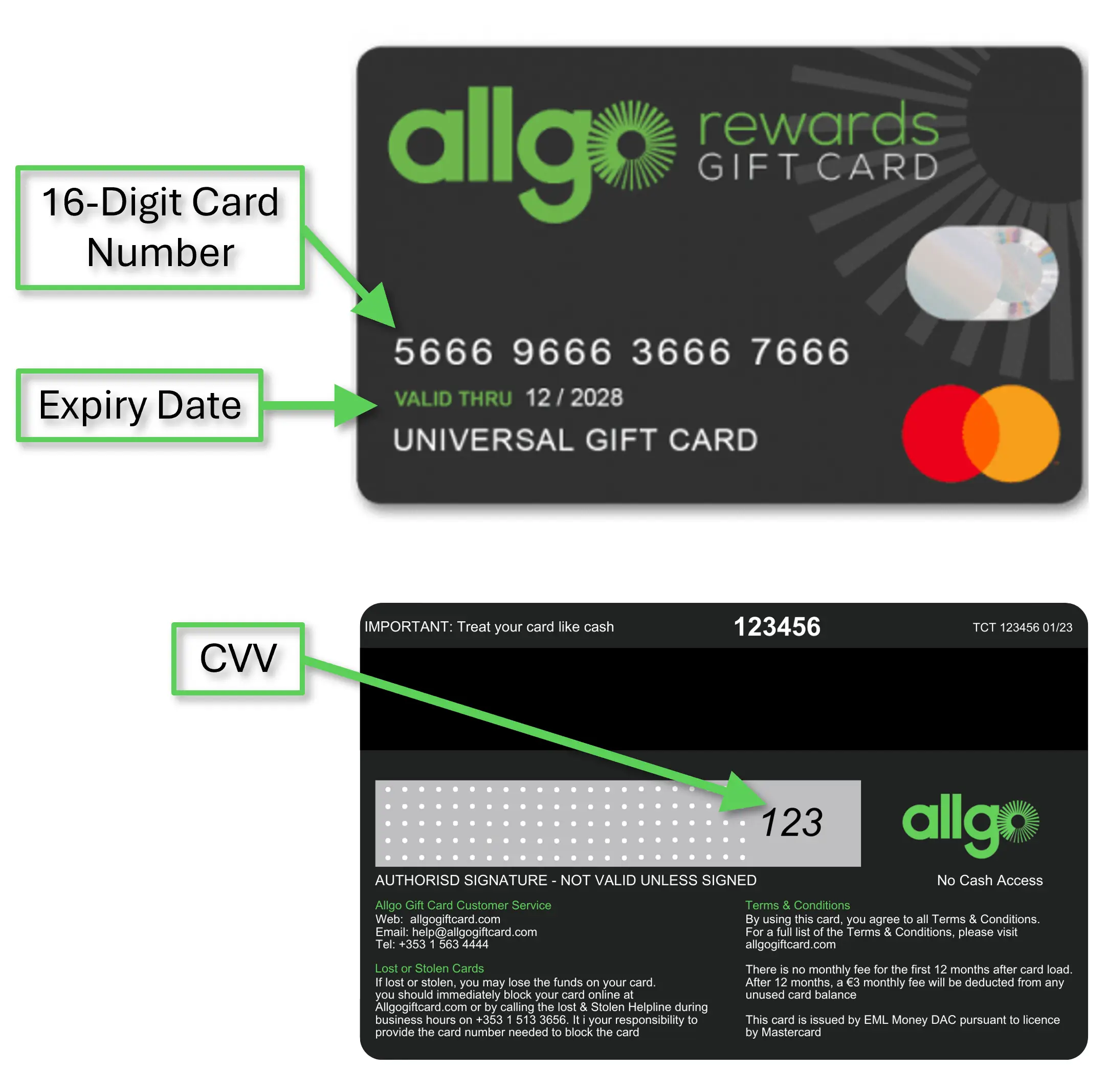
In most cases, payments are declined because your card has not been activated, or does not have sufficient remaining balance. You can check the status of both by logging into your allgo.getmybalance.com account.
Also, make sure you’re using your card the right way instore – Physical Cards must be swiped on the card machine, only Digital Cards can be tapped.
For online payments, 3D Secure must be enabled for your card via your AllGo account. Please also ensure you are entering all card details correct – the Cardholder name is your own name.
Some usage restrictions that apply to your AllGo Mastercard – please click here for more information.
If your physical AllGo Mastercard Gift Card is lost or stolen, you may lose the funds on your card.
You should immediately suspend your card by clicking on the Lock Card icon in My Card in your Get My Balance Cardholder Account or by calling the Lost & Stolen Helpline during business hours on +353 1 513 3656.
It is your responsibility to provide the card number needed to suspend the card which can be found through your allgo.getmybalance.com account. If you subsequently find your card, you can unsuspend it by emailing us on [email protected].
If you require a replacement, you can request this on this page*.
*Please note, your card will be subject to a €20 Replacement Fee which is deducted from your card’s balance.
This website uses cookies to enhance your experience. Some are essential for site functionality, while others help us analyze and improve your usage experience. Please review your options and make your choice.
If you are under 16 years old, please ensure that you have received consent from your parent or guardian for any non-essential cookies.
Your privacy is important to us. You can adjust your cookie settings at any time. For more information about how we use data, please read our privacy policy. You may change your preferences at any time by clicking on the settings button below.
Note that if you choose to disable some types of cookies, it may impact your experience of the site and the services we are able to offer.
Some required resources have been blocked, which can affect third-party services and may cause the site to not function properly.
This website uses cookies to enhance your browsing experience and ensure the site functions properly. By continuing to use this site, you acknowledge and accept our use of cookies.
